ShotBox for Mac
Your screenshots, finally organized.
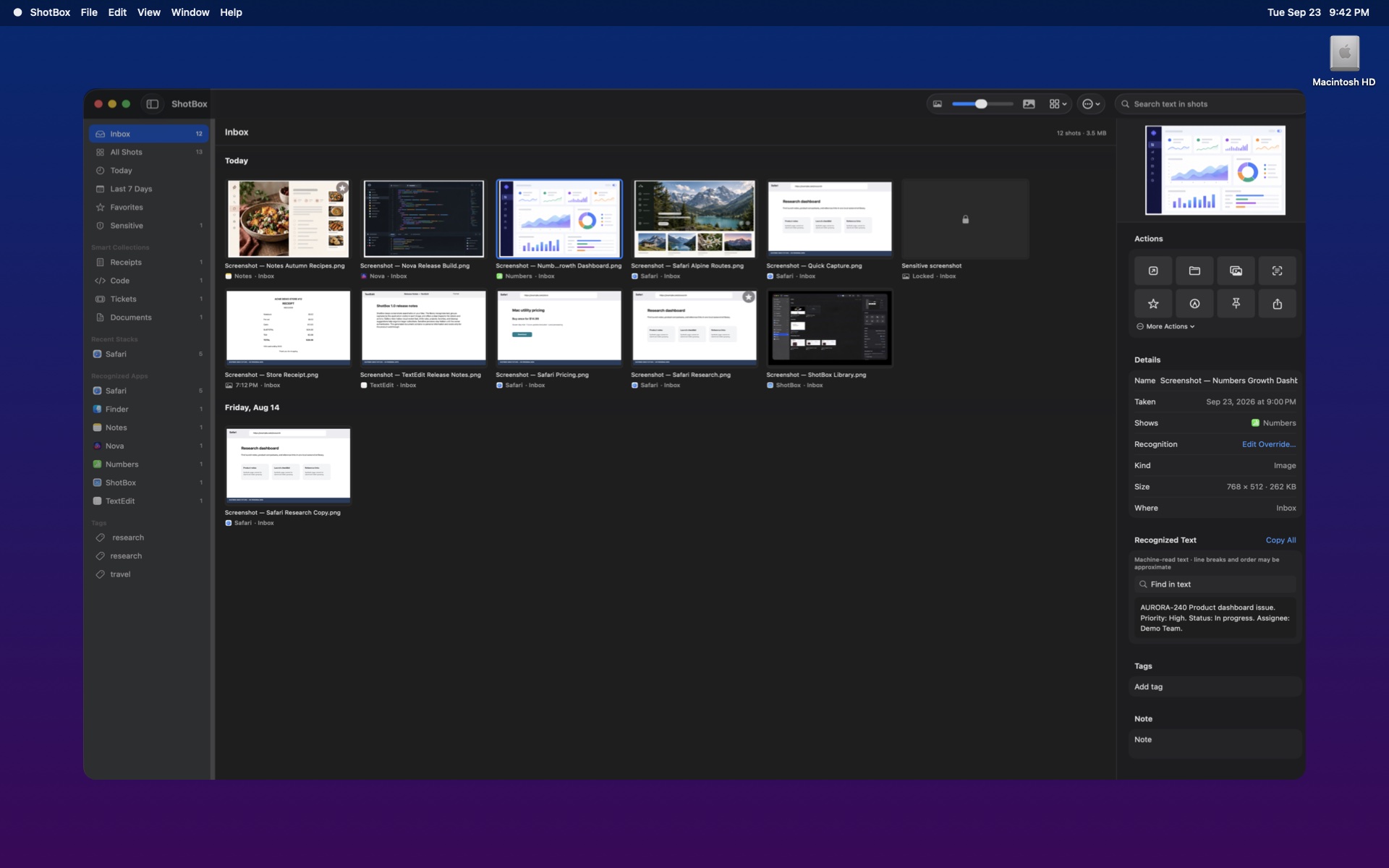
Capture, search, group, redact, and rediscover every screenshot in one private library on your Mac.
Version 1.0 · macOS 15 or later · Apple silicon
InboxLibrary
More than capture
A home for every screenshot you take.
ShotBox turns a folder full of images into a searchable, organized workspace without sending the contents anywhere.
Search what was inside the screenshot.
ShotBox recognizes text locally, so you can find an old receipt, error message, address, or idea even when the filename tells you nothing.
- On-device OCRSearch recognized text without uploading the image.
- Saved searchesKeep useful queries ready for the next time.
- Quick FindRetrieve a screenshot from any app and copy it immediately.
Recognized, stacked, and sorted for you.
Apps, websites, recent sessions, dates, projects, and smart collections give screenshots useful structure from the moment they arrive.
- Recognized AppsBrowse screenshots by the application shown or reliably captured.
- Recent StacksKeep related capture sessions together instead of repeating rows.
- Rules and projectsTag, favorite, file, and assign screenshots automatically.
From capture to action, without leaving the flow.
Capture a selection, window, screen, or recording. Then annotate, redact, pin, copy text, share, or file it while the context is still fresh.
- Quick action shelfImmediate actions after every new screenshot.
- Gallery viewReview large previews with a smooth horizontal filmstrip.
- Recording toolsTrim recordings and export useful clips or GIFs.
Keep the library useful as it grows.
Find duplicates, review cleanup suggestions, shrink large files to HEIC, and move items into a dated library without losing control.
- Duplicate detectionCompare images by visual similarity, not only filename.
- Reviewable cleanupSee suggestions before anything moves to Trash.
- Encrypted folder syncCreate encrypted copies using a passphrase ShotBox never stores.
Why ShotBox
Capture is only the beginning.
The built-in Mac shortcut creates a file. ShotBox helps you find, understand, protect, and reuse it later.
Private by design
Your screenshots stay on your Mac.
Text recognition, application recognition, search, duplicate checks, and sensitive-content detection run locally.
No screenshot cloud
ShotBox does not upload screenshots, recognized text, notes, tags, or searches to its servers.
Sensitive previews
Private-looking previews can stay obscured until you authenticate with Touch ID or your Mac password.
You own the files
Your originals stay in folders you choose and remain accessible even if ShotBox is removed.
Simple pricing
Try everything for seven days.
No feature limits during the trial. Buy once when ShotBox earns a place on your Mac.
₹1,499
One-time purchase · One Mac
- Seven-day full-feature trial
- Lifetime ShotBox license
- Future app updates included
- No subscription or account required
Questions
Before you download.
Does ShotBox upload my screenshots?
No. Screenshots, OCR text, notes, tags, and search queries remain on your Mac. Optional encrypted sync writes encrypted copies only to the folder you select.
What happens after the seven-day trial?
The library switches to the license screen and capture and import actions stop until you activate a license. Original screenshot files remain available in Finder.
Which Macs are supported?
ShotBox 1.0 currently requires an Apple silicon Mac running macOS 15 or later.
Can I reinstall ShotBox?
Yes. Your catalogue and license are stored separately from the app. Reinstalling does not include or transfer anyone else’s screenshots.
Take control of your screenshots.
Download ShotBox 1.0 and use the complete app free for seven days.
Download for MacSHA-256: 7c2249f3234c818ea871a6b50b05107968f943753886c47e07629afdcc32c84c